Case study · My own product
My personal AI agent
An assistant that runs on my own server and can do almost anything, because it supports skills and MCP connectors: every new capability is added as one more piece, without rebuilding anything.
- 3
- AI providers with fallback
- 3
- autonomy modes
- 5
- ways to talk to it
- 62
- stories, tasks and bugs in Jira
Demo Live
Talk to the agent
A real agent in a reduced version, with an AI model running on my own server and the same approval rules as the full agent. Use it to get to know me, get in touch and see how an agent helps run a project. It does not browse the internet: it only uses these tools.
- ReadGet to know meAnswers about my project management experience, AI, my education and the role I am looking for, using data from this site.
- ReadWriteMeeting or messageGives you my availability and the link to book 15 minutes, or sends me your message by email. It always asks you to confirm before sending.
- ReadProject trackingStatus report with a RAG rating, progress, team workload and risks with a proposed action for each one.
- WriteDangerousTask managementCreates tasks, reassigns them, changes dates and priorities, and deletes them. Depending on the mode, it asks for your approval first.
Type a request or pick one of the suggestions.
Messages are processed on my server and discarded when the session ends (2 hours at most). The project is test data. If you ask it to write to me, that message does reach me. Limit of 10 messages per person per day.
Features
What it can do
The foundation of the agent, finished and working.
Several brains, no downtime
Works with Claude, OpenAI or Ollama running locally. If the main provider fails, it automatically switches to the next one.
Agentic loop with tools
It reasons, decides which tool to use, runs it and keeps going until the task is done, streaming the answer in real time.
Persistent memory
It remembers conversations and important facts, with full-text search to retrieve them when needed.
Autonomous missions
It can be given one-off or recurring goals. It runs them in the background and delivers a report when done.
Jira and GitHub
It searches, creates, moves and comments on Jira tasks; manages repositories, issues and pull requests, and works with git on protected branches.
Web search
It searches the web and reads pages to answer with up-to-date information.
Skills
Packages of instructions and scripts installed from GitHub or a .zip and enabled from the interface. The agent loads each skill only when it needs it.
MCP connectors
It connects to any MCP server as if it were one of its own tools: email, calendar, documents and whatever comes next, without writing new code.
Voice and several interfaces
Web interface with the animated core, real-time voice conversation, wake word, desktop app with a keyboard shortcut, installable mobile app and terminal chat.
Latest Built and tested
From assistant to an agent that works on its own
Features already built with all tests passing, now being deployed to the server.
Parallel subagents
It splits a large task across several subagents, each with its own context and limited tools, and gathers their reports.
Persistent goals
Give it a goal and it keeps working on its own; a judge model decides after each step whether it is done, blocked or should continue.
Learns skills on its own
When it solves a complex task well, it saves the procedure as a new skill or improves an existing one, with versions and rollback. A daily curator archives the unused ones.
Browses and reads documents
It uses an automated browser, analyses images and reads PDFs (including scanned ones), Word and PowerPoint, with no access to the server's internal network.
Telegram
Text and voice-note conversations, mission alerts and one-tap approval of actions from the phone.
Incoming webhooks
Services such as GitHub, Jira or n8n can notify it of an event and it acts on fixed instructions, read-only by default.
Asks when in doubt
Before a decision that is hard to undo, it stops and asks with options in the interface, on Telegram or in the terminal.
Memory that understands
Meaning-based search across memories and conversations, and automatic summaries of long conversations so it keeps the thread without driving up cost.
Sandboxed execution
Commands run in a sandbox, with rules on what is allowed and restore points.
AI governance
Autonomy, with control
An agent that acts on its own needs clear limits. Every tool is classified by risk, and what it can do without asking depends on the chosen mode. Everything is kept in an audit log.
- READ
- WRITE
- DANGEROUS
Platform
- Own server with reverse proxy and HTTPS.
- Token-protected access to the interface, the API and the real-time channel.
- Docker image and docker-compose, with a profile to run models locally with Ollama.
- Continuous integration on GitHub Actions: linting, tests and image publishing.
- Installable on phone and desktop as a web app.
Admin panel
Everything is configured without touching the server
The main interface is just for talking to the agent. Configuration lives in its own panel, organised by sections, with masked secrets, connection tests, a single bar to save or discard, and changes that reach the interface live.
Status
Server health, active provider and connections.
Brain
AI provider and model, keys and fallback.
Behaviour
Autonomy mode and approvals.
Appearance
Base colour and response colour, with a live preview of the core.
Voice
Device or server voice, and transcription.
Integrations
Jira, GitHub and web search, with connection tests.
MCP connectors
Add and enable MCP servers.
Channels
Telegram: conversation, voice and alerts.
Webhooks
External events with their own secret, permissions and test button.
Skills
Install, enable and disable skills; review learned ones and their versions.
Memory
View, search, edit, pin, forget, export and import memories.
Project management
Managed as a product
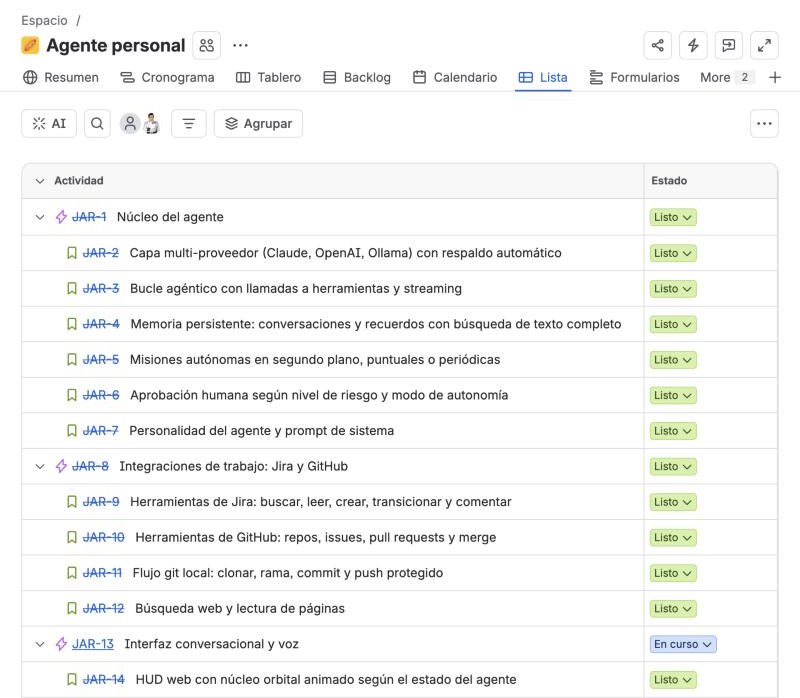
I ran it the same way I run my clients' projects: a Jira backlog with epics, stories and bugs, prioritised and reviewed continuously.
- Agent core: brain, tools, memory, missions and approvals.
- Work integrations: Jira, GitHub, git and web search.
- Interface and voice: web HUD, voice, desktop, terminal and installable app.
- Platform and quality: Docker, continuous integration, security, tests and deployment.
- Evolution: skills, MCP connectors and the roadmap.
Bugs are logged and prioritised too: a voice issue in iPhone Safari or a start-up without configured keys are part of the backlog, just like features.
Roadmap
What's next
Improvements already defined in the backlog.
- Talking to it from a floating sphere on the desktop, without opening the interface
- An "always listening" mode that can be switched off
- Automatic daily summary
- Autonomous work on tagged Jira tasks
- Automatic pull request review
- Automatic model selection per task
- Multiple users with their own permissions and memory
- Usage dashboard with cost per token and traces
Shall we talk?
If you are looking for a Project Manager who understands AI from the inside, I can walk you through the project in 15 minutes.